
Product
From the first inquiry to the rooming list.
Kruspin is an app for wedding coordinators, agencies and venues. Try taking one wedding from the first inquiry to the rooming list for reception.
Simplified demo · Emily & James's wedding
Step 1 of 5
Convert the inquiry to a wedding
The inquiry arrived through the website form. Once won, convert it to a wedding.
Inquiry · Emily Carter and James WilsonIn progress
- Location
- Ash Grove Estate
- Guest count
- 86
- Accommodation
- Friday and Saturday at the farm
- Client message
- We want an outdoor ceremony, with a rain backup plan.
No wedding yetCreated by converting an inquiry
- Couple
- —
- Location
- —
- Guest count
- —
- Internal channel
- —
In the appWedding overview
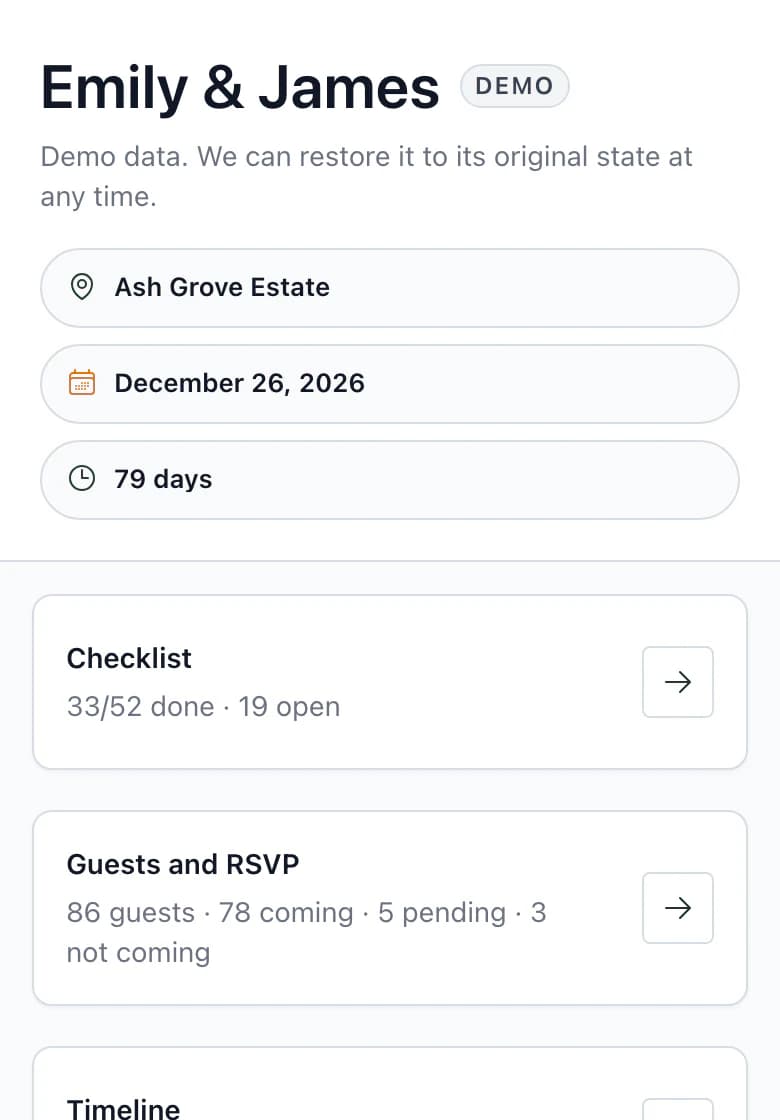
- Shared
- The inquiry context is in the internal channel. The client cannot see it.
- Manual
- You manage the inquiry and decide when it is won. You send the client invitation.
- Export
- Nothing. The inquiry stays in the app.
The full example as text
- Convert the inquiry to a wedding. The inquiry arrived through the website form. Once won, convert it to a wedding. Automaticky: Poptávka je Vyhraná. Svatba Anna & Jakub má jména, seat a počet hostů z poptávky. Automaticky: Do interního kanálu svatby se zapsala zpráva Kontext z poptávky. Ručně: Pozvánky pro Annu a Jakuba jsou předvyplněné. Odešlete je vy, až budete chtít.
- Approve Joshua Mitchell's response. Joshua completed RSVP on the guest website. The response reaches the guest list only after approval. Upozornění: Jméno sedí s hostem v seznamu, proto byla odpověď Ke kontrole. Hosta jste potvrdili vy. Automaticky: Počty se přepočítaly: přijde 77 → 78, čeká 6 → 5.
- Choose a seat for Joshua. Arrange the seating plan on the venue floor plan. There is one available seat at table 5. Automaticky: Na plánku je u Pavla masové menu a bez lepku z jeho odpovědi. Stůl 5 je plný, 8 z 8. Automaticky: Servisní předávka pro obsluhu má jeho řádek: stůl 5, seat 6, masové, bez lepku; Bez alkoholu. Bez alkoholu u Pavla zapsal tým. Ručně: Místo vybíráte vy. Klient může hosty usazovat také.
- Assign Joshua a room for each night. Manage accommodation by night. Every night has its own assignment. Automaticky: U Pavla v ubytování je vidět i jeho stůl. Upozornění: V sobotu Pavel mění pokoj. Rozpis pro recepci tu změnu zvýrazní. Ručně: Klient přiděluje do volných míst, dokud mu ubytování necháte otevřené.
- Check the rooming list for reception. Kruspin builds the list from rooms by night. Reception does not need to use the app. Export: Rozpis vytisknete jako PDF, nebo ho recepci pošlete odkazem. Ručně: Podklad předáte recepci, jak jste zvyklí.
App areas
Explore each area.
Each page explains one area: what you enter, who can see it and which documents it produces.
Next step
Plan your next wedding in Kruspin.
After signing up, you get the app with Emily & James's wedding. Explore its guests, seating plan, rooms and documents for vendors.
ToolsThe same guest from response to table, room and documents, tool by tool.
Frequently asked questions
Working in Kruspin.
Did not find an answer? Write to us through the page support.
What happens after I create an account?
Enter your email, accept the terms and conditions, and verify your email with a six-digit code. Then add your first name, last name, phone number, language and currency. Meanwhile, we prepare the app with Emily & James's wedding so you can try the guest list, seating plan and documents.
Can I bring in guests from my spreadsheet?
Yes. Upload a CSV or XLSX file, select a sheet and map the columns. Create columns for menus and custom details as you map them; there is no need to rework the spreadsheet.
Can I use Kruspin on my phone?
Yes, in your phone's browser. On the wedding day, your tasks, guests and timeline are all there.
What is outside Kruspin's scope?
Kruspin is not accounting software or a hotel booking system. The budget and payments give you an overview of the wedding. Accommodation keeps track of rooms and wedding guests; it does not sell rooms or connect to a hotel system.