
Client and team communication
Keep the discussion with the item it concerns.
Ask about the ceremony at the ceremony, and leave a payment note at the payment. Try it with the wet-weather ceremony plan.
Simplified demo · Emily & James's wedding
Step 1 of 3
Discuss it with the team
The client asks in the ceremony thread. Before replying, discuss it with the team in an internal thread at the same item.
Timeline · Saturday
Visible to 3 of 3 itemsThe team sees all items, including internal ones, and both ceremony threads.
- 10:30 11:30The check and decision are not in the plan yetA message in a thread does not change the timeline.
- 12:15Ceremony sound and microphone checkDJ James Bennett, Milestone CoordinationInternal
- 13:45Guests move to the ceremonyMilestone Coordination
- 14:00CeremonyDJ James Bennett, Charlotte Taylor Photo, Meadow Atelier
In the appWith client and Internal switch
The full example as text
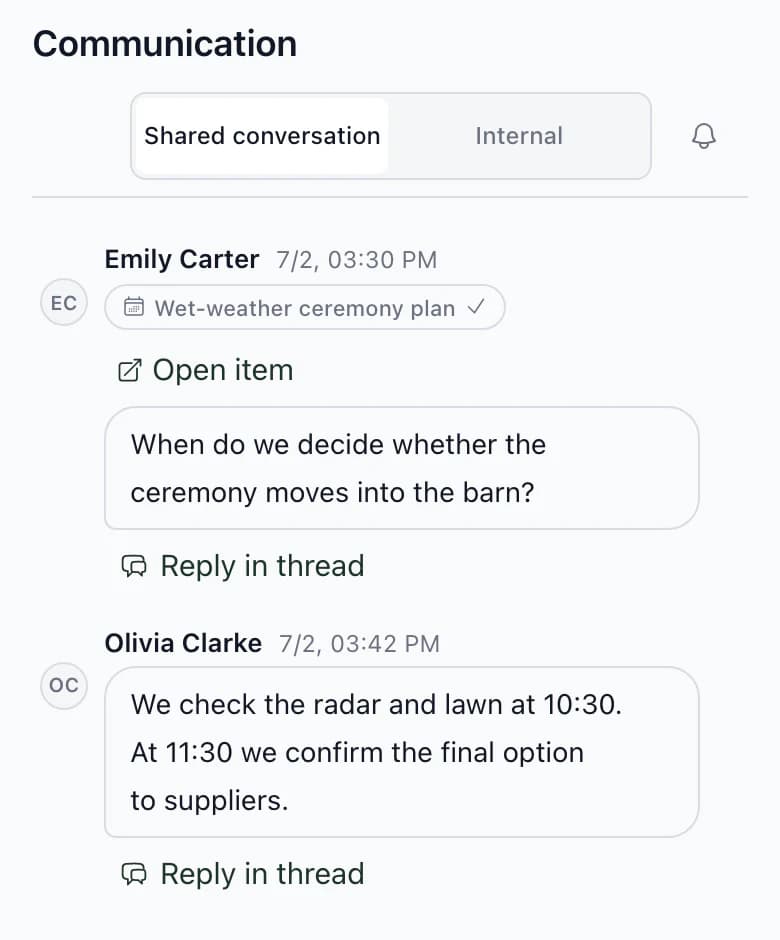
- Question. In the ceremony's client thread, Emily Carter asks when the decision will be made about moving the ceremony to the barn.
- Discuss it with the team. The client asks in the ceremony thread. Before replying, discuss it with the team in an internal thread at the same item. Automatically: The message is in the ceremony's internal thread. The client cannot see it. Manual: The timeline has not changed. A comment does not change the plan; you enter the items yourself.
- Record the check and decision in the timeline. The plan changes when you enter the items. Mark any item the client should not see Internal only. Manual: The 10:30 and 11:30 items are in the timeline. You entered them. Automatically: Both items are internal. The client cannot see them; the farm receives them in its document because it is assigned to them.
- Reply to the client and resolve the thread. Write the reply in the client thread. Resolving it is the next step; the thread does not close itself. Automatically: Emily will see the answer in the ceremony thread. She receives a notification according to her settings. Manual: You resolved the thread. It stays attached to the ceremony, with the full discussion.
- The timeline through each role's eyes, with both new items marked internal. Team: 10:30, 11:30, 12:15, 13:45, 14:00. The team sees all items, including internal ones, and both ceremony threads. Client: 13:45, 14:00. The client sees non-internal items and the thread with you. They do not see the internal thread. Estate Ash Grove Estate: 10:30, 11:30, 13:45, 14:00. Document for Ash Grove Estate: non-internal items plus internal items assigned to the farm. You can add or remove rows for the document. DJ James Bennett: 12:15, 13:45, 14:00. Document for DJ James Bennett: non-internal items plus internal items assigned to the DJ. You can add or remove rows for the document.
In the app
What you will find in communication.
A thread attached to an item
Start a thread at a task, timeline item, guest, table, room, payment or candidate in vendor selection. Attach up to 8 photos to a message and mention a teammate using @.
Context from the inquiry
When a won inquiry becomes a wedding, Kruspin records what you know in the internal channel: people, date, venue, guest count, the client's message and your note.
Client responses
When a client marks interest in a vendor candidate or completes their task, it appears in internal communication.
All weddings in one communication area
Agency communication sorts weddings and private conversations by the latest message and shows unread messages. Search finds weddings by name and messages by text.
Private messages
Team members can also write outside wedding threads. Within your agency, only those two people can see the message.
Next step
What the client can change in the app.
Client collaboration
Adds guests and assigns rooms, can only view the budget, and cannot see internal threads.
Software for wedding coordinatorsSix things to check when choosing software, each with an example from the app.
Keep wedding discussions out of your inbox.
After signing up, you get the app with Emily & James's wedding. Start a thread at any task, guest or room.
Frequently asked questions
Communication in practice.
Did not find an answer? Write to us through the page support.
Will Kruspin replace email and chat with clients?
Not completely, and it does not have to. Threads suit discussions about wedding items: guests, rooms, menus, payments and the timeline. The client receives an email notification and replies in the app. Keep calls and quick messages as before; record their outcomes in the plan.
What if you write something to the client that is only for the team?
Move your last message in a With client thread to internal communication, or delete it. If the notification email has not yet gone out, the client will not receive it. An email already sent cannot be recalled.
How do notifications work?
The default is an email summary after 30 minutes, including for the client in their channel. Each person can choose immediate email, app notifications only, or no notifications, and enable quiet hours. Mute a thread you do not need to follow. An @ mention can also trigger a browser notification if you allow them.