
Seating plan
Arrange seating on the actual venue floor plan.
Place tables on a scaled venue floor plan and assign guests to specific seats. Service staff receive a table list with the food for each seat.
Joshua Mitchell
the Mitchells · Emily & James's wedding
Simplified demo
- Attendance
- Attending
- Menu
- Meat
- Dietary restrictions
- gluten-free
- A seat at the table
- Unseated
- Friday
- Needs attention
- Saturday
- Needs attention
Seat Joshua at table 5
Stodola · hostina 86Table 5 in the middle of the second row · 7 of 8 seats
Unseated
Joshua MitchellMasové · bez lepku · bez alkoholu
Select an available seat at table 5. An occupied seat shows the guest details available to the serving staff.
ExportSeating – service handover
Until Joshua has a seat, service staff will not find him in the table list.
The full example as text
- Response. Check Joshua Mitchell fills in the form through a shared link. His response waits under Responses awaiting approval. Joshua is already on the list, so it is marked Needs review and the matching name preselects the guest. Existing guest list details remain until approval. Automatically After approval, Joshua's record has attendance, menu and dietary restrictions. The seating plan, service document and kitchen counts then use his response.
- Venue. Manual Joshua is in the unseated list with a dot in his menu color; seat him in available seat 6 at table 5 in the barn. If a seated guest replies Not attending, they stay at the table, the service document flags RSVP Not attending, and you free the seat.
- Rooms. Manual Assign a room separately for Friday and Saturday. A full room cannot accept another guest. The room stays assigned until you remove it.
- Documents. Export Service staff get names, meals and dietary restrictions at each seat; the kitchen gets menu and dietary restriction counts without names; reception gets arrivals, room changes and departures. Print documents as PDFs or send them by link.
In the app
A name, menu and dietary restrictions at every seat.
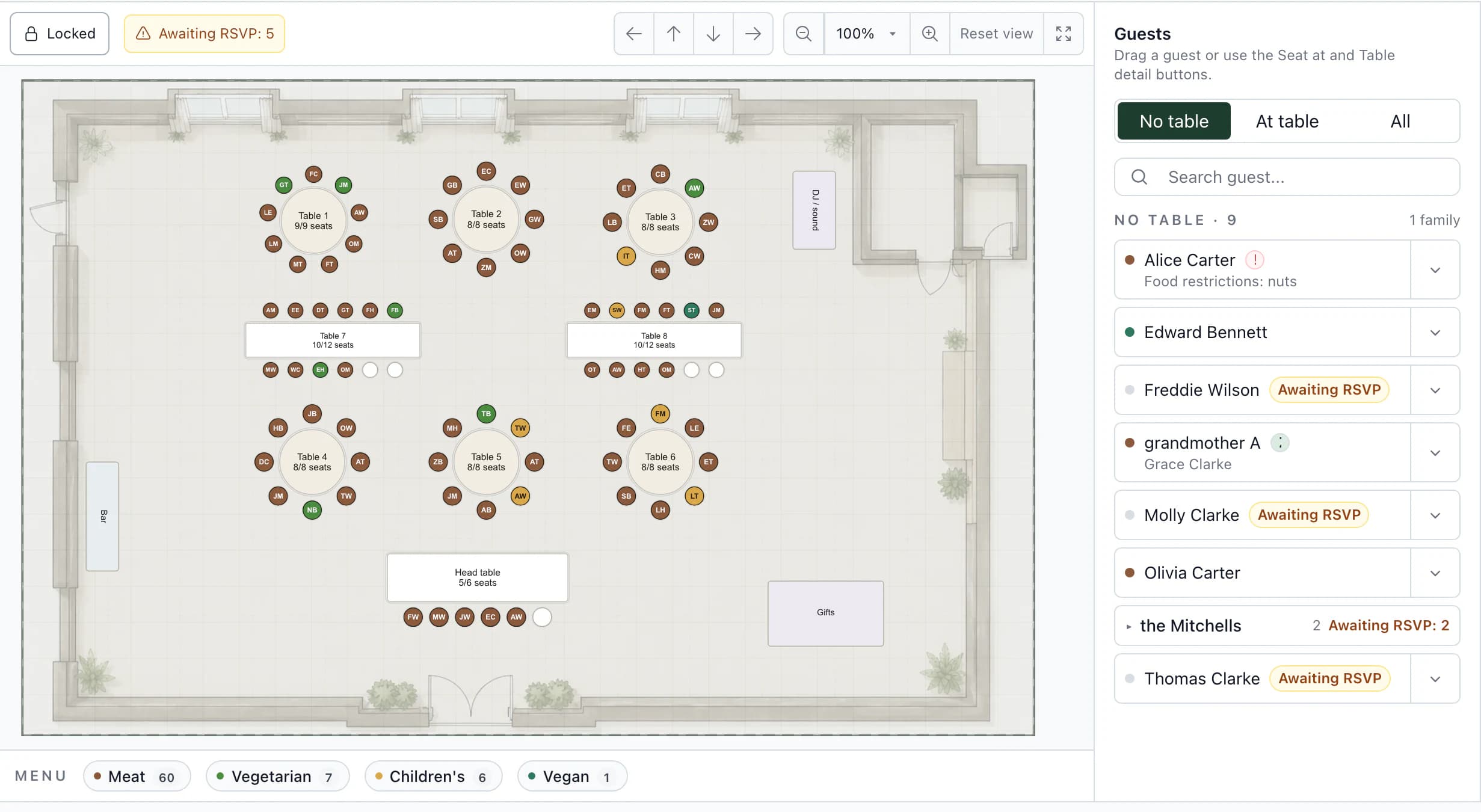
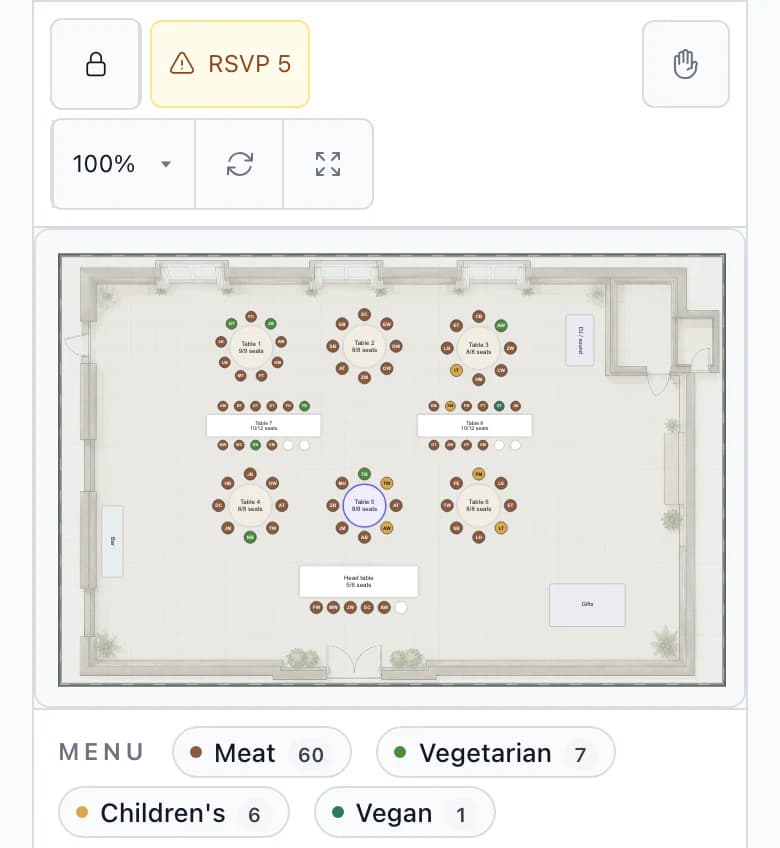
The room plan and guest list sit side by side. At each table, see who sits where, what they will eat and what they cannot eat.
Seat numbers
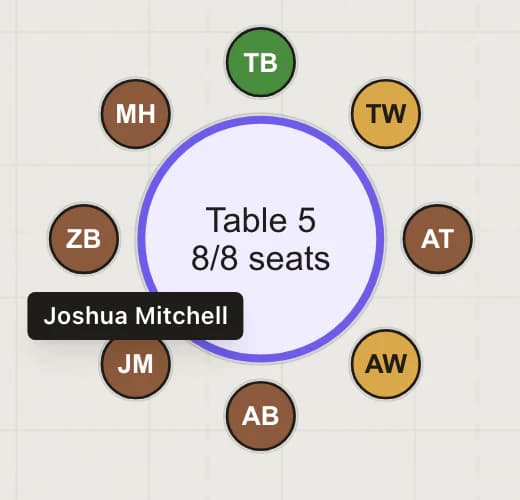
Every guest has a seat number at their table, so staff know which meal goes to whom. A baby sitting on a lap appears as +1 without a chair.
Menus and dietary restrictions beside the name
The dot uses the RSVP menu color, and dietary restrictions appear below the name. Service staff find the same details at the seat number in their document.
Multiple layouts
A wedding can have several layouts, such as one for the ceremony and another for dinner. Link each one to an RSVP event.
More detailsSeat numbers · Menus and dietary restrictions beside the name · Multiple layouts
Seat numbers
Every guest has a seat number at their table, so staff know which meal goes to whom. A baby sitting on a lap appears as +1 without a chair.
Menus and dietary restrictions beside the name
The dot uses the RSVP menu color, and dietary restrictions appear below the name. Service staff find the same details at the seat number in their document.
Multiple layouts
A wedding can have several layouts, such as one for the ceremony and another for dinner. Link each one to an RSVP event.
You do this
- Prepare the spaceManual
- Arrange the tablesManual
- Seat your guestsManual
- Check what is missingCheck
The app does this
- Give service staff their documentExport
The process in 5 stepsWhat happens at every step and what the app prevents
Prepare the spaceManual
Bring in a space from the venue library as a copy without tables, use a template, or start with an empty plan. Add a PNG, JPG, WebP or PDF floor plan underneath and set the scale using two points and their real distance.
Arrange the tablesManual
Round, rectangular, oval and banquet tables, serpentine tables and rows of ceremony chairs. Add a dance floor, bar, DJ or buffet. When numbering, the app recognizes the couple's table and starts there.
Seat your guestsManual
Drag guests from the Unseated panel to specific seats. The dot beside their name has the color of the menu they chose in RSVP.
Check what is missingCheck
The plan shows how many guests are awaiting RSVP, who has a seat despite declining, and how many still need a menu. You cannot add another guest to a full table.
Give service staff their documentExport
The Seating – service handover document includes a room map with names and menu colors, plus a seat list for each table with meals and notes. Print it as a PDF or send it by link.
Who sees what
The couple seats guests; the team manages the layout.
Seat 6 at table 5, as seen by your team, the client and the guest. Only your team edits tables and the space.
One output, 3 viewsSeat 6 at table 5
Team
You and your coordinators
- Guest
- Joshua Mitchell
- Menu
- Meat
- Dietary restrictions
- gluten-free, no alcohol
- Tables and space
- upravujete
Room layout, tables and guest seating.
Client
Emily and James
- Guest
- Joshua Mitchell
- Menu
- Meat
- Dietary restrictions
- gluten-free, no alcohol
- Tables and space
- neupravuje
Seats and moves guests. Choose in settings how many days before the wedding all access becomes read-only.
Guest
Wedding website
- Table and seat
- not on the website
- Menu
- only in the form
Guests cannot see the seating plan on the wedding website.
Next step
From the table to the room.
Accommodation and rooming list
Assign the same guest accommodation by night, and reception gets a rooming list.
Seating plan templateA downloadable spreadsheet for service staff with table, seat, menu and dietary restrictions, no account needed.
Choosing software? Six things to check
Arrange the seating for Emily & James's wedding.
After signing up, you will find it in the app: a barn with a floor plan, a head table, six round tables and two long tables. Four confirmed guests do not have seats yet. Try seating them.
Questions
Common questions about the seating plan.
Did not find an answer? Write to us through the page support.
What about guests who have not replied yet?
You can seat them straight away. Use the Awaiting RSVP button to filter them at any time. If a seated guest declines, the plan shows them among those not attending and you free their seat.
How do I seat children and babies?
A child has their own seat like any guest. For a baby on a lap or in a high chair, turn off Needs a chair in the guest list; they appear at the table as +1 without a chair.